Showing posts with label Google Gmail News. Show all posts

Friday, May 27, 2011

How to Import AIM Friends into Google Talk

AIM has integrated its messenger service with Google talk.Now Google Talk and AIM have single login.This means you don't need to login separately in both accounts to talk with your friends.You can easily talk with your AIM friend on your Google talk id.You just need to import all your AIM buddies into Google Talk.

Import Google Talk friend into AIM buddies

At the launch time of AIM and Google talk integration,there was no tool to automatically add AIM contact list to Google Talk.You have to manually add your AIM friends list to Google Talk.
But now AIM has provided a tool that will automatically imports your AIM's contact list into your Google talk.

This is just a two step process.Click on Import to Gmail.This page will ask you to login into your AIM account.
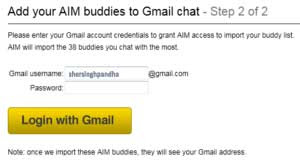
Add your AIM buddies to Gmail Chat

After you logged into your AIM account,next step is to add your Google talk credentials.Add your Google Talk ID and password.After you added your, it will tell you when it is done.

For now you can import only 38 contacts.If the number of contacts in your AIM list is more than 38,than you have to add them manually.
Read rest of entry

Saturday, April 16, 2011

Gmail gets Background Customization Feature

Google has added yet another eye-candy feature to its web-based email service - Gmail. Over two years ago, Google had added themes in Gmail which certainly impressed several users, geeks and Gmail loyalists. Today onwards, Google will let you customize your Gmail with any image or your own custom image for the background. Yes, you can customize your Gmail with Kelly Clarkson's wallpaper, Dark Knight Rises Poster, or even a photo of your own. Wonder why took Gmail so long to introduce this feature.

Do note that adding a huge image to your Gmail background might make your web browser a wee bit slower. To customize background image on Gmail, go to Themes Tabs in Settings or just click here to go there directly in Gmail.

In the Themes tab, the last option is "Create your own theme" where you must click and a pop-up window will show up. Over there, you'll get a wireframe like snapshot of your Gmail, where you can customize the different areas with the colors of your choice. Click on the small box on top left corner of that window to give you a drop-down menu about colors and an option to upload image.

Check out the image below to find the upload image option where in you can pull image from Picasa or upload directly from your computer.


Read rest of entry
Related Posts Plugin for WordPress, Blogger...

Popular Latest Gadgets


Latest Gadgets, Coolest Mobile Gadgets, Computer Gadgets, Desktop Gadgets Copyright © 2009 Gadget Blog is Designed by Ipietoon Sponsored by Online Business Journal